Short answer: images don't push a page higher in Google's normal results on their own. But they decide whether a page can appear in Google Discover and Google Images, and good images make a page more useful, which is what rankings reward. A relevant cover photo gets a story shown well in Discover; charts, screenshots and real photos of your own work are what make the story itself stronger.
We had to answer this for ourselves when we launched this site. Here is what Google says, and what we decided.
Where images matter most: Google Discover
Discover is the feed of stories on the Google app and on Android phones. For a news or blog site it can bring more visits than search itself, and stories only show up well there with a good image. Google's Discover guidelines ask for:
- Large images, "at least 1200 px wide."
- The
max-image-preview:largesetting, a robots meta tag that lets Google show the image big. Without it, your story may get a small thumbnail. - No generic images. Google says to "avoid using generic images (for example, your site logo)" as the share image, and to "avoid using text-heavy images."
That last line surprised us. Many sites, including this one at first, use a generated card with the headline written on it as the share image. That is exactly a text-heavy image. A real chart or screenshot is better.
Where images matter second: Google Images
Image search sends real traffic, especially for how-to and product topics. Google's image guidelines come down to a few habits:
- Alt text first. Google calls alt text "the most important attribute" for describing an image. Describe what the image shows, as you would to someone who can't see it, without stuffing keywords.
- Put images near the text they illustrate, on a page about the same subject.
- Use short, descriptive file names, like
weekly-impressions.png, notimage1.jpg. - Keep them fast. Google notes that images "are often the largest contributor to overall page size." Compress them and serve sizes that fit the screen.
Alt text also does a second job: screen readers read it aloud, so it's part of making your site accessible.
Which images are worth adding
| Image | Helps SEO? | Why |
|---|---|---|
| Chart of your own data | Yes | Original, gets shared and linked, works in Discover |
| Screenshot of a real result or setting | Yes | Proves the steps are real, often what searchers want to see |
| Photo of your actual work, team or place | Yes | Unique, builds trust, ranks in image search |
| Diagram of a process | Usually | Helps readers, can rank for "how does X work" |
| Stock photo | As a cover, yes; in the story, rarely | A relevant, sharp photo meets Discover's image rules. Inside the story it adds weight, not information |
| Text card with your headline | Not for Discover | Google asks to avoid text-heavy images there |
What we do on this site
- Every story has a cover photo, 1600 pixels wide, chosen to match the story and checked by eye. It's also the share image Discover sees. Photographers are credited on our photo credits page.
- Inside stories, every image is ours: a chart of our own data or a screenshot of real work, with client names hidden.
- Every image has alt text describing what it shows. Our build stops if one is missing.
- Every page sets
max-image-preview:large.
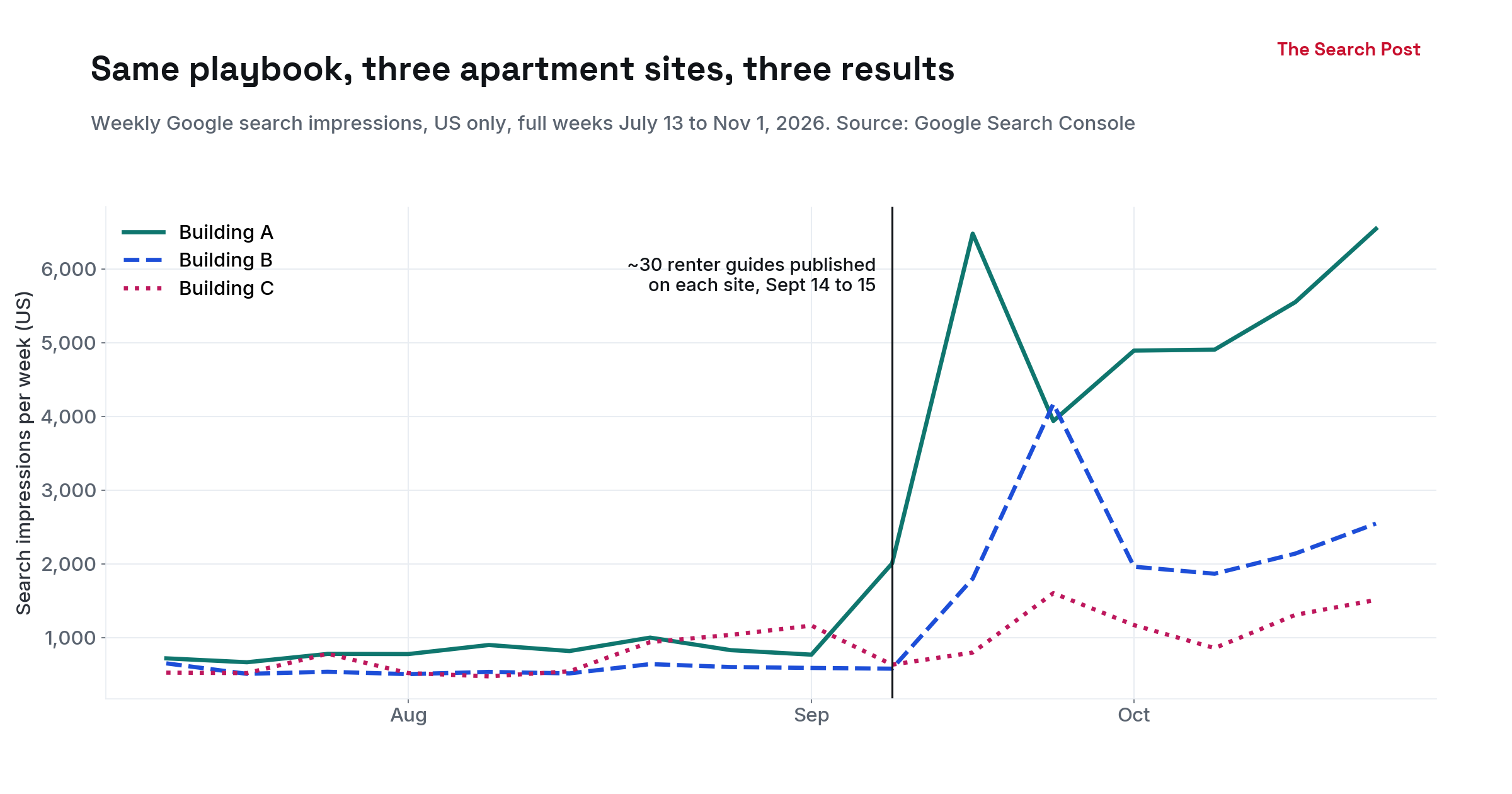
Here is an example, the chart from our three apartment sites case study. It's 2400 pixels wide, has a descriptive file name and full alt text, and the same numbers are in a table in the post for anyone who can't see it.
The bottom line
If you only do three things:
- Add
max-image-preview:largeto every page. - Give every article one relevant, wide cover image (1200 pixels or more), and use it as the share image instead of a text card.
- Write real alt text for every image.
Inside the story, skip decorative photos. Spend that space on a chart or screenshot only you can show.